Microsoft Purview integration
This adapter can sync dbt metadata to Microsoft Purview Data Catalog, enriching your Fabric tables with descriptions, business metadata, and lineage from your dbt project.
Why this integration
Microsoft Purview has a built-in integration with Microsoft Fabric that scans your Fabric workspace and discovers items like Warehouses, Lakehouses, Notebooks, and Pipelines. However, this built-in scanner has significant limitations when it comes to the metadata that dbt users care about:
| Capability | Built-in Purview scanner | dbt Purview sync |
|---|---|---|
| Table discovery | Lakehouse tables only (preview). Data Warehouse tables are not scanned as sub-items. | Searches for existing entities first, creates them if missing. Works without live view or scanning. |
| Column discovery | Not populated for either Lakehouse or Data Warehouse tables. | Creates column entities for all physical columns (discovered from the database catalog), with data types and descriptions from dbt YAML where available. |
| Table descriptions | Not populated. Must be manually entered in the Purview portal per table. | Automatically pushed from dbt model YAML files after every run. |
| Column descriptions | Not populated. Must be manually entered per column. | Automatically pushed from dbt column YAML files after every run. |
| Table-level lineage | Not supported. The scanner only captures item-level lineage (e.g., Lakehouse → Notebook → Lakehouse), not which specific table was derived from which other tables. | Full table-level lineage graph based on dbt's ref() and source() dependencies. |
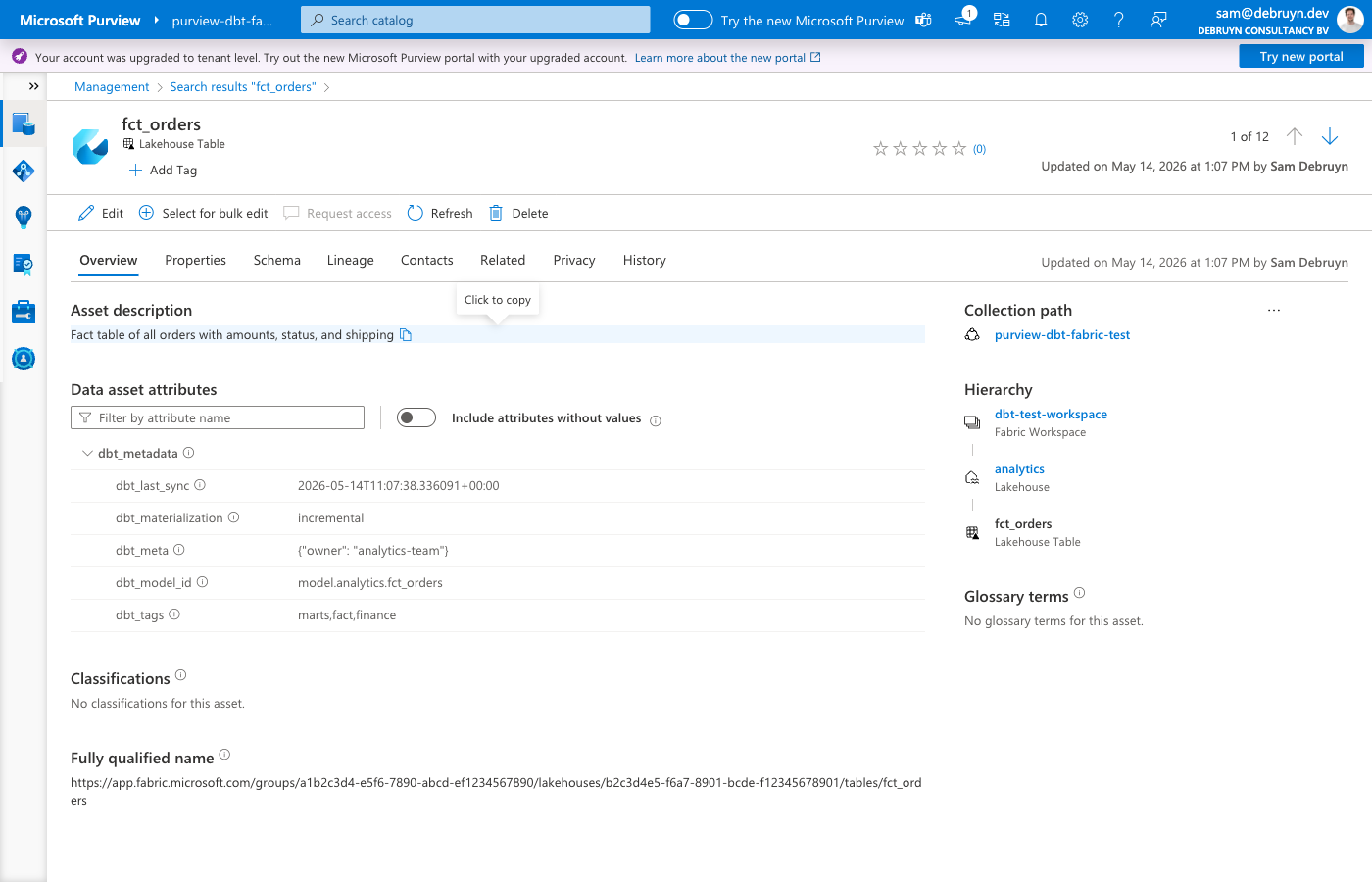
| Business metadata | Not populated. No built-in mechanism to attach tags, test results, or custom metadata to table entities. | Automatically creates a dbt_metadata business metadata type with model ID, tags, materialization, test names, test results, custom meta, and sync timestamp. |
| Automation | Runs on a scan schedule configured in Purview. | Runs automatically after every dbt run via on-run-end hook, or on-demand via dbt run-operation. |
In short: the built-in Purview integration discovers what exists in Fabric at the item level (Warehouses, Lakehouses). This dbt integration goes deeper: it registers individual tables and columns, adds what each table means (descriptions), shows how tables relate to each other (lineage), and documents what guarantees are in place (tests, tags, metadata).
No Purview scanning or live view configuration is required — the adapter creates all necessary entities directly via the Purview Data Map API. This means you can skip configuring Fabric scans in Purview entirely, which saves scan capacity costs and removes the delay between table changes and catalog updates. If you do already have scans configured, the sync works alongside them — existing entities are enriched, not duplicated.
How it works
The sync uses a "search first, create if missing" approach for all entity types. If a Purview entity already exists (from live view or a scan), the sync enriches it. If no entity exists, the sync creates it via the Purview Data Map API. This means users don't need to configure live view or run scans for the sync to work.
Lakehouse tables — the sync searches for existing fabric_lakehouse_table entities and creates them if missing. Column entities (fabric_lakehouse_table_column) are created for all physical columns discovered from the database catalog.
Data Warehouse tables — the sync creates the full entity hierarchy: fabric_warehouse → fabric_warehouse_schema → fabric_warehouse_table → fabric_warehouse_table_column. Custom Purview types are registered automatically (see Custom Purview types). If a fabric_warehouse entity already exists from live view, the sync reuses it.
For both adapter types, the sync then:
- Pushes descriptions and business metadata from dbt model and column YAML to the entities — model descriptions, column descriptions, tags, materialization type, test results, and custom meta are all synced in a single bulk update
- Creates column entities for all physical columns (from database catalog), with data types and descriptions from dbt YAML where available
- Creates lineage between tables using dbt's
ref()andsource()dependency graph
The sync writes to userDescription (not description), so it never overwrites metadata set by Purview scanners.
Configuration
Add the purview_endpoint to your target in profiles.yml:
my_project:
  target: dev
  outputs:
    dev:
      type: fabric  # or fabricspark
      # ... existing configuration ...
      purview_endpoint: "https://your-account.purview.azure.com"
You can find the endpoint URL in the Azure portal under your Purview account's Properties page (labeled "Atlas endpoint") or in the Purview governance portal settings.
Alias
You can also use purview as an alias for purview_endpoint.
Authentication
The Purview integration reuses the same authentication method configured for your Fabric connection. No additional authentication setup is needed. The identity must have Data Curator and Data Reader roles in the Purview account's root collection.
All authentication methods supported by the adapter work with Purview.
Usage
Automatic sync after every run
Add the macro to your dbt_project.yml as an on-run-end hook:
This syncs metadata for all models that were part of the run.
Manual sync
Run the sync manually as a dbt operation:
This syncs metadata for all models in the project, regardless of whether they were recently run.
Options
The purview_sync macro accepts these parameters:
| Parameter | Default | Description |
|---|---|---|
sync_descriptions |
true |
Push model and column descriptions to Purview |
sync_lineage |
true |
Create lineage relationships in Purview |
sync_metadata |
true |
Push business metadata (tags, tests, materialization) |
Example with options:
# Only sync descriptions, skip lineage and metadata
on-run-end:
  - "{{ purview_sync(sync_lineage=false, sync_metadata=false) }}"
Or via the CLI:
Controlling which models are synced
The sync respects dbt's persist_docs configuration. Models where persist_docs is explicitly disabled are skipped entirely — no descriptions, no business metadata, and no lineage are pushed to Purview for those models.
persist_docs setting |
Purview behavior |
|---|---|
| Not configured (default) | Full sync: descriptions, metadata, and lineage |
relation: true |
Full sync |
relation: true, columns: true |
Full sync including column descriptions |
relation: true, columns: false |
Model description, metadata, and lineage — column descriptions skipped |
relation: false, columns: false |
Skipped entirely — nothing is synced to Purview |
Example — sync all models except a staging layer:
# dbt_project.yml
models:
  my_project:
    staging:
      +persist_docs:
        relation: false
        columns: false
    marts:
      +persist_docs:
        relation: true
        columns: true
What gets synced
Descriptions
| Source | Target |
|---|---|
Model description |
userDescription on the table/view entity |
Column description |
userDescription on the column entity |
Business metadata
A custom business metadata type called dbt_metadata is automatically created in Purview. It contains:
| Attribute | Source | Example |
|---|---|---|
dbt_model_id |
Model unique ID | model.my_project.orders |
dbt_tags |
Model tags | finance,daily |
dbt_materialization |
Materialization type | incremental |
dbt_meta |
Custom meta (JSON) | {"owner": "data-team"} |
dbt_tests |
Test names on model | not_null_id,unique_id |
dbt_test_status |
Test results from last run | all_passed or 2/3 passed |
dbt_last_sync |
Sync timestamp | 2026-01-15T10:30:00+00:00 |
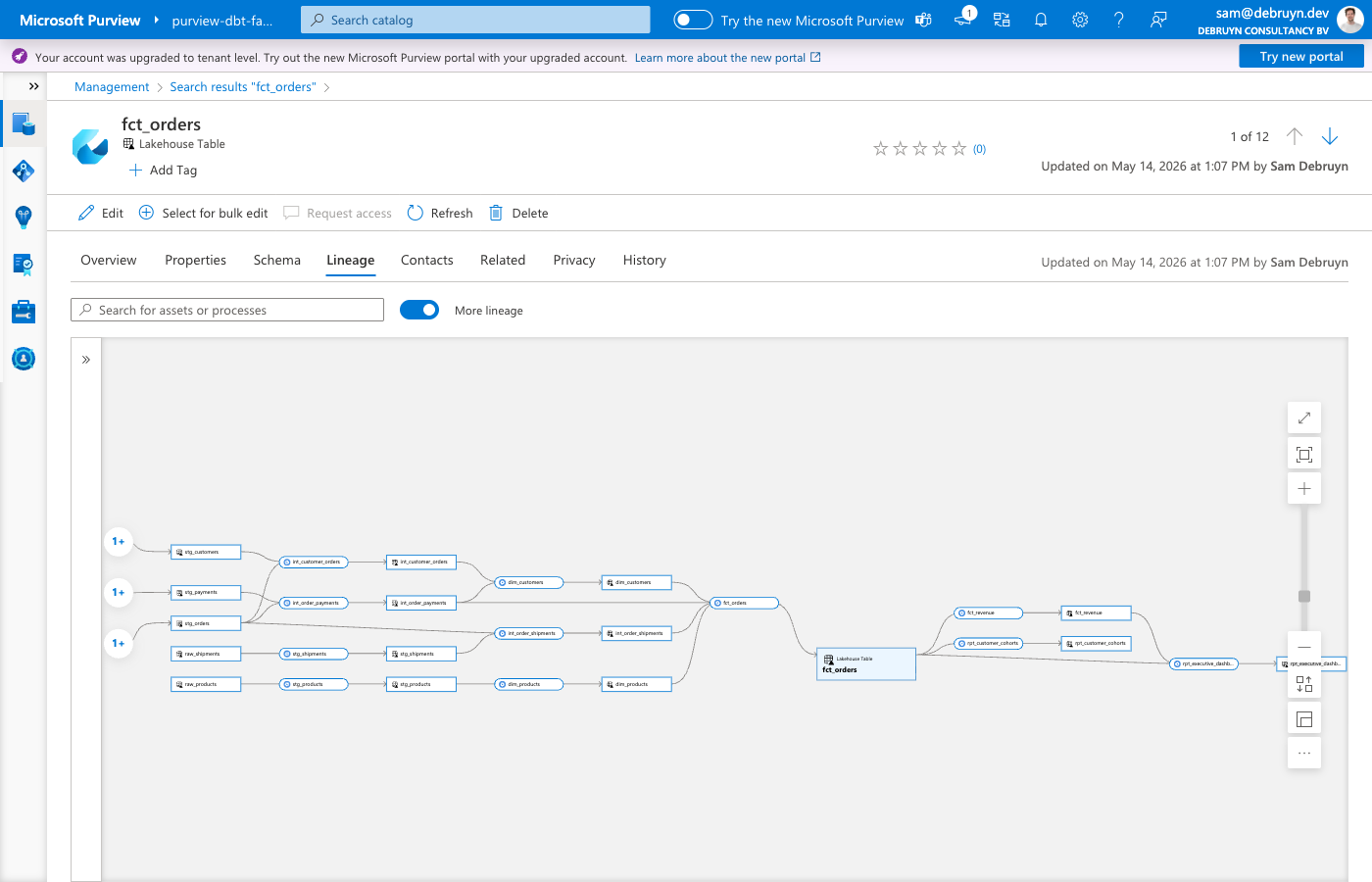
Lineage
For each dbt model with upstream dependencies, the sync creates:
- A
dbt_transformationentity representing the dbt transformation dataset_process_inputsrelationships from upstream tables to the processprocess_dataset_outputsrelationships from the process to the output table
This shows up in Purview's lineage view as a graph of how data flows through your dbt models.
Entity matching
How dbt models are matched to Purview entities depends on the adapter type:
- FabricSpark (Lakehouse) — the sync searches for existing
fabric_lakehouse_tableentities by name and filters by the Fabric item GUID. If an existing entity is found (from a scan or live view), the sync enriches it. If no entity is found, the sync creates one via the Purview API. - Fabric (Data Warehouse) — the sync creates
fabric_warehouse_tableentities via the Purview API, along with parentfabric_warehouseandfabric_warehouse_schemaentities. If afabric_warehouseentity already exists from live view, the sync reuses it rather than creating a duplicate.
Ephemeral models are skipped in both cases since they don't produce physical tables.
Unique item names within a workspace
Lakehouses and Warehouses in the same workspace must have distinct display names. The sync resolves database names to Fabric items via the Fabric REST API and checks Lakehouses first. If a Lakehouse and a Warehouse share the same name, the sync always matches the Lakehouse, which causes wrong entity types in Purview.
Column entities
Neither Purview's live view nor its scanner creates column entities for Fabric items. The dbt sync creates column entities for all physical columns by querying the database catalog at sync time. This means every column in the table gets a Purview entity — not just columns documented in dbt YAML files.
Column data types come from the database catalog (the actual SQL types), and column descriptions from dbt YAML are overlaid where available. Columns without a dbt description still get a Purview entity with their data type.
- Lakehouse — creates
fabric_lakehouse_table_columnentities (Purview's native type) linked tofabric_lakehouse_tableentities. Attributes:dataType. - Data Warehouse — creates
fabric_warehouse_table_columnentities (custom type, see below) linked tofabric_warehouse_tableentities. Attributes:data_type,length,precision,scale,isNullable.
Custom Purview types
The adapter registers custom type definitions in Purview. These types are created automatically the first time the sync runs.
dbt types
| Type | Kind | Supertypes | Purpose |
|---|---|---|---|
dbt_metadata |
Business metadata | — | Attaches dbt model metadata (tags, materialization, tests, meta, sync timestamp) to table entities |
dbt_transformation |
Entity | Process |
Represents a dbt transformation in the lineage graph, linking upstream tables to the output table |
Data Warehouse types
| Type | Kind | Supertypes | Relationship to parent |
|---|---|---|---|
fabric_warehouse_schema |
Entity | Asset |
warehouse → fabric_warehouse |
fabric_warehouse_table |
Entity | DataSet, Purview_Table |
dbSchema → fabric_warehouse_schema |
fabric_warehouse_table_column |
Entity | DataSet |
table → fabric_warehouse_table |
The Data Warehouse hierarchy mirrors the native azure_sql_dw types (warehouse → schema → table → column) but uses Fabric-specific naming so the entities appear correctly in the Purview catalog alongside other Fabric items.
For Lakehouse tables, no custom types are needed — the adapter uses the native fabric_lakehouse_table_column type that Purview already defines.
Supported adapters
The Purview integration works with both adapter types:
- FabricSpark (Lakehouse) — enriches
fabric_lakehouse_tableentities discovered by Purview's Fabric workspace scan, and creates column entities. - Fabric (Data Warehouse) — creates the full entity hierarchy (schema, table, columns) via the Purview API, linked to the
fabric_warehouseentity that the Fabric scanner creates.